NV.gov

Apply List Structure to Elements that Logically Form a List
"List structure should be used wherever a logical list is present, and nowhere else. Don't merely create something that looks like a list by starting each paragraph with a bullet character. Likewise, don't apply list structure to elements that do not logically form a list."
WebAIM ~ web accessibility in mind
Accessible HTML Lists
Ensuring accessibility in lists is an important aspect of web design, as it helps users with different abilities navigate and understand content more effectively. Here are some considerations and best practices for creating accessible lists:Provide Descriptive List Items:
Ensure that each list item contains clear and concise content that describes its purpose. This is particularly important for users who rely on assistive technologies.
Use Nested Lists for Subitem
For subitems or nested lists, use proper indentation and the appropriate list elements to maintain a clear hierarchy.
Ensure Contrast and Readability
Make sure that list items have sufficient contrast against the background for readability. This is important for users with visual impairments.
Provide Context with Headings
If lists are part of a larger section, consider using headings (<h2>, <h3>, etc.) to provide context and structure.
Test with Screen Readers
Regularly test your lists using screen readers to ensure a positive user experience for individuals who rely on these tools. You can contact adaremediation@it.nv.gov to request screen reader testing.
Standards and Best Practices
Creating Lists in Optimizely
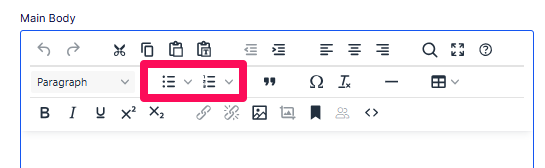
In either a Main Body element or a Rich Text Block click either the bulleted list icon or numbered list icon in the 2nd row of the toobar to start a list. You can also type the text for your list and then select the text and click either the bulleted list or numbered list icon to create your list.